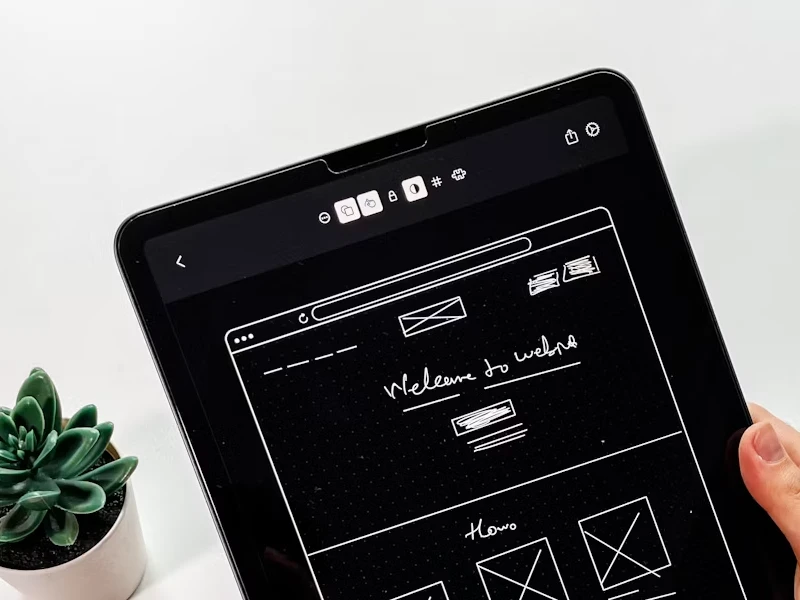
Are you planning to design soon a new website or app? It’s important to have patience and not start the design process immediately, but try to create wireframes in order to save a lot of time and resources.
Wireframing helps designers to successfully avoid various design mistakes and speed up the entire process. Starting with creating the right wireframes will make the entire design process easier, providing a map for visualizing the entire web architecture and user flows before creating any design elements.
What Is A Wireframe?
Wireframing represents the UX process in which a designer creates two-dimensional and low-fidelity representations of the app or web interface. More specifically, it represents the essential structure of a screen within the website or app project.
Wireframing includes:
- Navigation panels
- All UI and UX design elements
- Various interactive components
- Screen layouts
Wireframing is different from any other process because it only includes the structure, layout, and functionality of a website or app design without the aesthetic elements that are later included in the design. In wireframing, the most frequent colors are white, black, and gray, used especially for graphic symbols and flowcharts.
What Makes A Good Wireframe?
A comprehensive wireframe is considered a foundation for any website or mobile app design because, based on it, designers will be able to create smooth user experiences while maintaining effective communication with the design and development teams. Let’s review some of the key characteristics of a good wireframe:
- Scalability: the right wireframe will be flexible enough to adapt to the different changes in design or content.
- Clarity: A good wireframe must communicate effectively both the structure and functionality of the design.
- Adaptability: the wireframe must be versatile in order to work on various devices and screen sizes.
It’s important to mention that wireframing techniques and tools can significantly improve the entire design process. For example, low-fidelity wireframes are the perfect choice during brainstorming because they focus mostly on the basic structure of the website or app design. On the other side, the high-fidelity wireframes are created with details like spacing and typography to offer a more authentic preview of the finished product.
In order to find wireframe examples, various tools such as Adobe XD, Sketch, or Figma wireframe are providing templates and features that could significantly streamline the website or app design process while supporting the collaboration between team members.
40% OFF
Only this February
Upgrade to UI PRO version of Uinkits Systems to unlock 23.000 UI components.
Use the code "FEB40"
Best Mobile Wireframes Examples in 2025
1. eCommerce App Mobile Wireframe Example
E-commerce wireframes focus more on clean and minimal navigation with a visible search bar and easy-to-access categories for products. This mobile wireframe prioritizes user flow and also ensures a smooth user experience.
In 2025, e-commerce Mobile wireframes ensure a foundation for the later design, with a user-centered design focused on providing an intuitive shopping experience.
Designers can look for examples on Figma wireframes and other tools, such as Dribbble, to choose the right foundation for their designs.
2. Food Delivery App Mobile Wireframe Example
The Food Delivery wireframe example stands out from other examples due to its simplicity in the design, along with the step-by-step process.
A Food Delivery mobile wireframe example includes a simple, clear Call To Action for actions such as selecting meals, customizing different orders, and checking out the final order.
3. Health & Fitness Tracker Wireframe example
With an intuitive dashboard, the Health and Fitness Tracker wireframe example must feature visual data representation like activity rings and graphics. The user flow is specially created for users to access the user’s daily goals and health suggestions. Here, the 2025 dark mode trend is present in order to reduce eye pressure for users.
This wireframe is available on Dribble, but for other ideas, such as a Figma wireframe example, feel free to access the Figma website.
4. Travel Booking App Wireframe example
The Travel booking wireframe example should feature interactive maps, itinerary previews, and real-time updates for all your reservations. For the travel booking apps, responsiveness represents a priority in the design process, but also the user-friendly approach to booking your travel must be the star of the project.
Designers can use tools such as Adobe XD, Figma, and others to develop this project, but it is possible to start from scratch with some good initial ideas.
Best Website Wireframe Examples in 2025
In 2025, most website wireframes focus more on blending functionality with a user-centered design. Let’s discuss some examples of wireframes that are successful.
1. E-commerce Website Wireframe Example
An E-commerce website should have a wireframe that prioritizes a responsive design in order to ensure a seamless experience in different layouts, desktop or mobile. Key features in this wireframe should include a structured grid system and Call to Action buttons that are strategically placed to be easily recognizable. In 2025, the grid system for websites will most likely be a trend because it has a more dynamic look. For website wireframe examples, designers can have a look at the Figma community to find the best one for the project’s needs.
2. Educational Platform Wireframe Example
This kind of wireframe should focus more on accessibility and usability, ensuring a simple navigation menu, along with easily recognizable search bars and progress trackers. This wireframe design must incorporate various placeholders for learning suggestions to personalize the learning experience. UI UX designers can use Adobe XD in order to create various interactive elements for the website wireframing prototype.
3. News Website Wireframe example
Usually, a website wireframe for news is focused on providing modular content blocks specially designed for articles, videos, and also breaking news banners. In 2025, designers should consider introducing an infinite-scrolling design to attract more users to read various articles. Also, artificial intelligence can be incorporated here to suggest different articles based on the user's reading behavior.
Don’t hesitate to use Call to Action buttons such as “Subscriber” or “Read More” because these are easily seen by readers.
4. Portfolio Website Wireframe Example
This wireframe example is the best choice for professionals in the creation industry who are looking to showcase their best projects on a dedicated website for potential clients. It’s important to include in this wireframe CTAs such as “View more projects” or “Contact” in order to gain more visibility. In 2025, the Portfolio website wireframe should have a storytelling layout approach to prioritize visual storytelling. Sketch is the best platform to design the portfolio website wireframe because it can ensure a design that is visually appealing and easy to interact with.
5. Travel Blog
Travel Blog websites prioritize visual storytelling through expanded images, story highlights, and interactive maps. In 2025, the current trends are focused on micro-interactions such as scroll-triggered animations and cursor hover. Adobe XD is the perfect design platform to create a travel blog wireframe because it allows the designer to create user engagement based on clickable prototypes.
Find Your Favorite Wireframe Example
Take inspiration from these wireframe examples and examine how you can integrate these 2025 trends into your own designs and projects. Feel free to share your favorite wireframing techniques and tools with the design community.
uinkits – Our Figma Design System and UI Kits
We at uinkits understand the importance of great user experiences and creating amazing UI designs. That’s why we’ve developed a Figma UI Kit with design components that include these essential UI elements that enable you to design intuitive and user-friendly interfaces effortlessly.
“You press the button, we do the rest.” – Kodak.
Inspired by this iconic tagline from Kodak, we believe in simplifying the design process for you. Our Figma UI Kit, uinkits, is a complete design system with UI components that allows you, as a UI UX designer, to create your products as quickly as pressing a button.
Our design system includes UI components, icons, variables, cards, buttons and everything you need for your design process. All you have to do is take your UI design component needed, and you’re ready to use it in your designs!
By
Cristi Fonea
•
November 19, 2025