Figma Config is the event that every designer and developer looks forward to in order to see some of the most unique and creative features that can make their design processes much simpler and focused on creativity.
Figma Config has become the stage for announcing the features and tools the company has been developing over the past year, with a strong focus on helping creative and development teams build better digital experiences together.
And this year, Figma didn’t disappoint its users, because the company's central message was very clear: creativity should never be restrained by the limitations of the existing tools. Instead, the company thinks that design software should evolve to support some of the boldest ideas.
Code Layers: Bringing Development Directly Into the Design Canvas
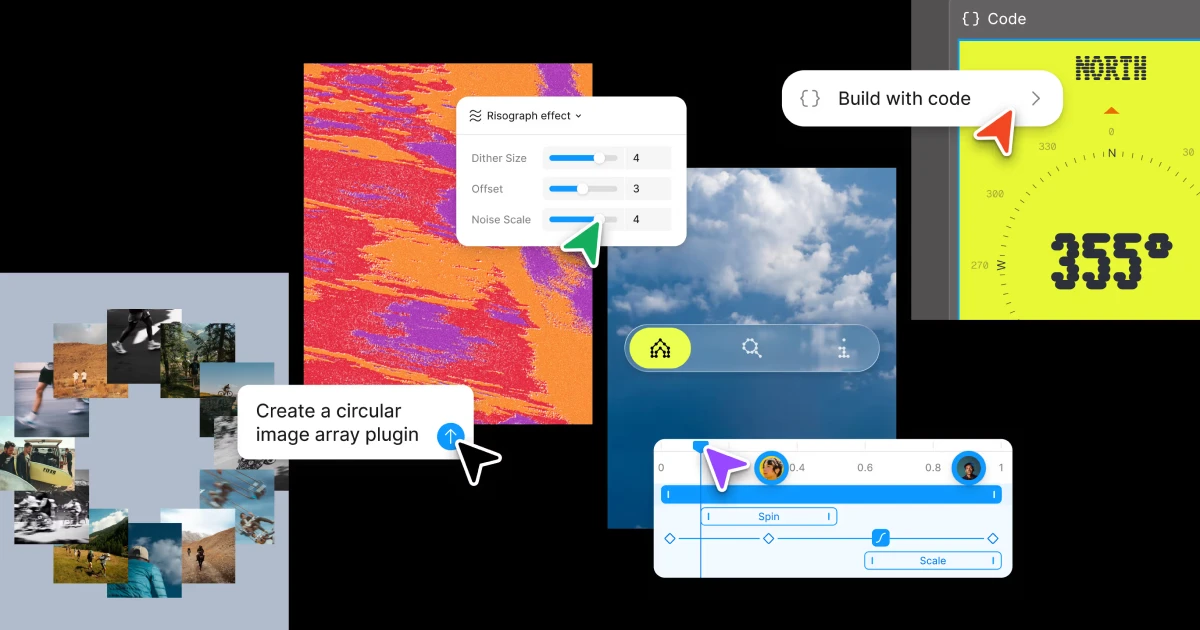
One of the biggest announcements at Figma Config 2026 was the introduction of Code Layers, a feature that challenges the traditional separation between design and development. Design is a creative process, while code is simply another design material, alongside vectors, images, and other visual elements. With that idea in mind, Figma introduced Code Layers.
With a single click or an AI prompt, any design layer can be transformed into an interactive code layer directly on the canvas. Just like regular design frames, code layers can be duplicated, allowing teams to explore multiple concepts side by side.
Figma Motion: Bring Designs to Life
With Figma Motion, users can now create animations directly inside Figma without leaving the design environment.
Figma Design now includes a dedicated timeline with keyframes, animation presets, and additional controls for building motion from scratch. Designers can also apply animations to existing designs or use the Figma AI agent to generate a starting point, making the animation process faster and more accessible.
Figma Motion is built directly into the platform, and animations can become part of a design system. Once a component is animated, that motion can be reused consistently across screens, projects, and collaborators, just like colors, typography, and other shared design properties.
40% OFF
Only this February
Upgrade to UI PRO version of Uinkits Systems to unlock 23.000 UI components.
Use the code "FEB40"
Shader Fills and Effects
Shaders have long been part of Figma's rendering engine, but creating and sharing them has traditionally required technical knowledge. With the latest update, Figma makes shader creation much more accessible for designers.
Users can now describe the effect they want in natural language or provide an image as a reference, and the Figma AI agent will generate the shader automatically. Shader effects modify the appearance of existing layers, while shader fills create entirely new visual materials.
Since these shaders are generated by the Figma AI agent, they include editable parameters by default. Designers can adjust these controls directly on the canvas, making it easy to customize and refine the final result.
Figma Weave Tools
Figma has also brought Weave tools directly into the Figma canvas, extending its approach to visual content creation and making it easier to build, reuse, and share creative workflows.
Weave is a node-based workspace designed for creating generative AI workflows. Users can connect multiple AI models, transform assets, refine generated results, and compare different approaches within a single workflow. Instead of relying on a single prompt, Weave allows users to build repeatable processes that can be inspected, improved, and reused over time.
Figma Config has become one of the most anticipated events in the product design industry, bringing together designers, developers, product managers, and creative professionals from around the world.
The 2026 edition focused on making collaboration between designers and developers more seamless than ever. Many of the announcements centered on reducing the gap between design and code, while introducing new AI-powered capabilities that simplify complex workflows.
uinkits – Our Figma UI Kit
We at uinkits understand the importance of inputs in great user experiences and creating amazing UI designs. That’s why we’ve developed a Figma UI Kit with design components that include these essential UI elements that enable you to design intuitive and user-friendly interfaces effortlessly.
“You press the button, we do the rest,” – Kodak.
Inspired by this iconic tagline from Kodak, we believe in simplifying the design process for you. Our Figma UI Kit, uinkits, is a complete design system with UI components that allows you, as a UI UX designer, to create your products as quickly as pressing a button.
Our design system includes components, icons, variables, cards, buttons, and everything you need for your design process. All you have to do is take your UI design component needed, and you’re ready to use it in your designs!
By
Cristi Fonea
•
June 26, 2026